
 Taya365
 GUIDE
GUIDE REGISTER
 DEPOSIT
 WITHDRAWAL
 TAYA365 APP
 AGENT
AGENT SABONG
 SPORTS
 CASINO
 FISHING
 LOTTERY
 PROMOTIONS
This guide explains the complete TAYA365 registration process, including requirements, supported information formats, official access reminders, and common issues encountered by new users. Follow the steps below to open an account accurately and avoid delays during verification or future transactions.
What You Need Before Registering
Before creating a new account on TAYA365, ensure you meet the following requirements:
Eligibility
Before creating a new account, make sure you meet the required conditions to ensure your registration is accepted and processed correctly.
- You must be at least 18 years old.
- You must have a valid mobile number capable of receiving OTP messages.
- Only one account per user is permitted.
Required Information
Prepare the following details for the registration form:
- Full name (must match your ID or bank account)
- Mobile number
- Password
- Optional: Agent/Referral code
Device & Internet Requirements
Using compatible devices and a stable internet connection helps prevent delays, form errors, or OTP issues during registration.
- A smartphone, tablet, laptop, or desktop
- Stable internet connection to avoid OTP delays
- Updated browser for smoother registration
Important Reminder: Official Access Only
Always register through the official TAYA365 homepage link. Using unverified links may lead to incorrect access, failed OTP delivery, or potential data exposure. If unsure, confirm the official link with customer support before proceeding.
How to Register a TAYA365 Account (Step-by-Step)
Below is the standardized process for creating an account.
Step 1 – Visit the Official TAYA365 Homepage
The first step is to access the correct platform link to ensure you reach the official registration form and avoid invalid or non-functional pages.
- Open your browser and enter the official link at taya365.net.ph.
- Locate the “Register” button at the upper-right corner of the homepage.
- Clicking the button will open the account creation form.

Step 2 – Fill Out the Registration Form
Once the form opens, enter your information carefully and follow the required formats to avoid errors or delays in completing the registration.
Agent Code (Optional)
Enter only if provided by a verified partner. If not, leave this blank.
Username
- 8 to 25 characters
- Do not include special characters or spaces
- Must not duplicate an existing username
Nickname
This is the display name seen during platform interactions.
Password & Confirmation
- Minimum 8 characters
- Combine letters and numbers
- Password and confirmation must match
Mobile Number
- Must be active
- Used for OTP and account recovery
- Avoid using someone else’s number
Once completed, double-check information to ensure accuracy.
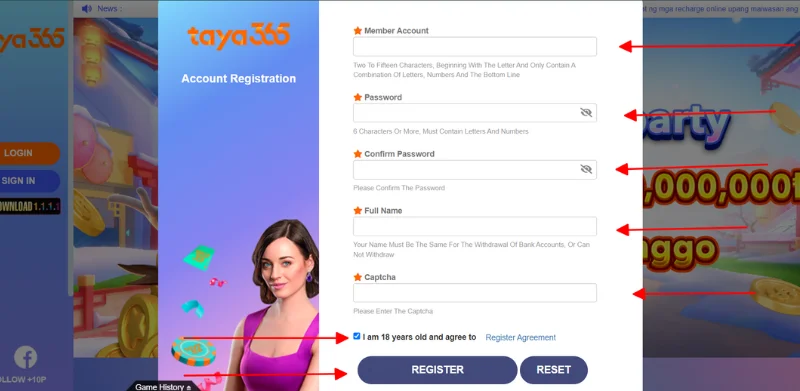
Step 3 – Verify Age & Accept Terms
Before submitting:
- Tick the checkbox confirming you are 18+
- Review the Terms & Conditions presented on the website
- Ensure the details entered match your identity and banking information
Step 4 – Submit & Complete Registration
After verifying your information and accepting the terms, submit the form to generate an OTP and finalize your account activation.
- Click “Confirm” to submit the form
- The system will send an OTP to your mobile number
- Enter the OTP to activate the account
If the OTP is not received, refer to the troubleshooting section below.
Once verified, your account is officially created and ready for login.
Registration Notes for New Users
To ensure smooth account creation, keep the following in mind:
1. Use Accurate Personal Information
Information must match future documents used for verification and transactions. Incorrect names, mismatched phone numbers, or temporary details may cause withdrawal delays later.
2. Avoid Duplicate Registrations
Only one account is allowed per user. Creating multiple accounts may trigger system review or access restrictions.
3. Use the Correct Official Link
Registration must only be done through the official homepage. Do not register through forwarded or unfamiliar links.
4. Keep Your Login Details Secure
Do not share your password with anyone. Avoid storing login details on public devices.
Common Issues During TAYA365 Registration
New users may encounter a few common problems during registration. The table below outlines typical issues, their causes, and how to resolve them effectively.
| Issue | Possible Cause | How to Fix |
|---|---|---|
| OTP Not Received |
|
|
| Username Already Exists |
|
|
| Form Not Accepting Input |
|
|
| Registration Page Not Loading |
|
|
| Phone Number Invalid |
|
|
| Unable to Submit Form |
|
|
Tips for a Smooth Registration
These recommendations can help you complete the registration process faster and reduce potential errors during account creation.
- Prepare your mobile number before starting
- Ensure a stable connection during OTP verification
- Do not close the registration tab while waiting for OTP
- Store your username and password in a secure place
- Use the same number and name for future transactions to avoid verification delays
Conclusion
The TAYA365 registration process is straightforward when the correct steps and requirements are followed. By using accurate information, confirming official access links, and verifying your mobile number, you can complete account creation quickly and avoid potential issues during future transactions.
FAQs – Registering on TAYA365
No, only one account per user is allowed.
No, the agent code is optional.
Double-check your mobile number and request a new OTP. If still not received, contact customer support.
Yes, but it may require verification through support.
You must be 18 years or older.
